It’s been a while since i have been “searching” build events but recently i made a mistake in creating setup for a customer by packing my own app.config so i have to do this all over again(poor me) so i decided to find a way to deploy the “right” app.config file every time.
Of course you can use many apps/procedures to do this and in large teams you can use servers just for this thing (along with unit testing and stuff of course …) but for a poor developer like me which comes from the all-time-classic-keeping-things-simple-DOS-age this is the most sufficient solution. Here it goes(i suppose you have a windows project with a app.config file ready)…
Create a app_deploy.config file in project directory
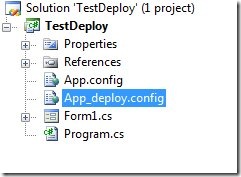
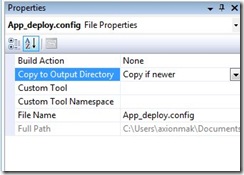
then while app_deploy.config is selected go to properties (F4) and change the “Do not copy” property to “Copy if newer”
after that right click on project and select “Properties”, select “Build Events” tab and push the “edit post-build” button
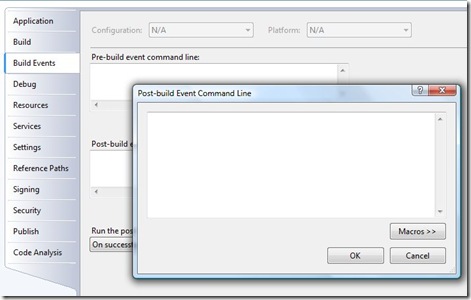
finally you can write this script into the window (or you can write your own DOS-like scripts using the macros described there)
IF $(ConfigurationName) == Debug GOTO end
md c:\Build\TestProject
copy $(TargetPath) c:\Build\TestProject
copy $(TargetDir)app_deploy.config c:\Build\TestProject\$(ProjectName).exe.config
copy $(TargetDir)*.dll c:\Build\TestProject
:end
this line is checking that it isn’t debug mode
IF $(ConfigurationName) == Debug GOTO end
second line makes a build directory
md c:\Build\TestProject
the third line copies the .exe file to output directory
copy $(TargetPath) c:\Build\TestProject
the forth line deploy our configuration file and rename’s it to match the exe file
copy $(TargetDir)app_deploy.config c:\Build\TestProject\$(ProjectName).exe.config
the fifth line copies the necessary dll’s that application requires
copy $(TargetDir)*.dll c:\Build\TestProject
and the last is the “escape” line of the debug mode
after this you can build your project in any other mode than debug and then the “deployable” files in c:\Build\TestProject
Thank you for reading this and see you soon!!!
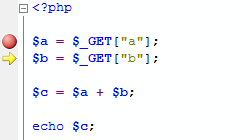 It’s been a long time since my last post cause I’ve been working in a e-shop project build on top of osCommerce. My background in php was very limited so i have to go “slow”. At first i used the very friendly (to php devs whatsoever) Rapid PHP, but it wasn’t fit my needs anymore so i “googled” for something like “php visual studio 2008” to see if there’s something new-on-the-block and easily come up with the vs.php.



.gif)
